
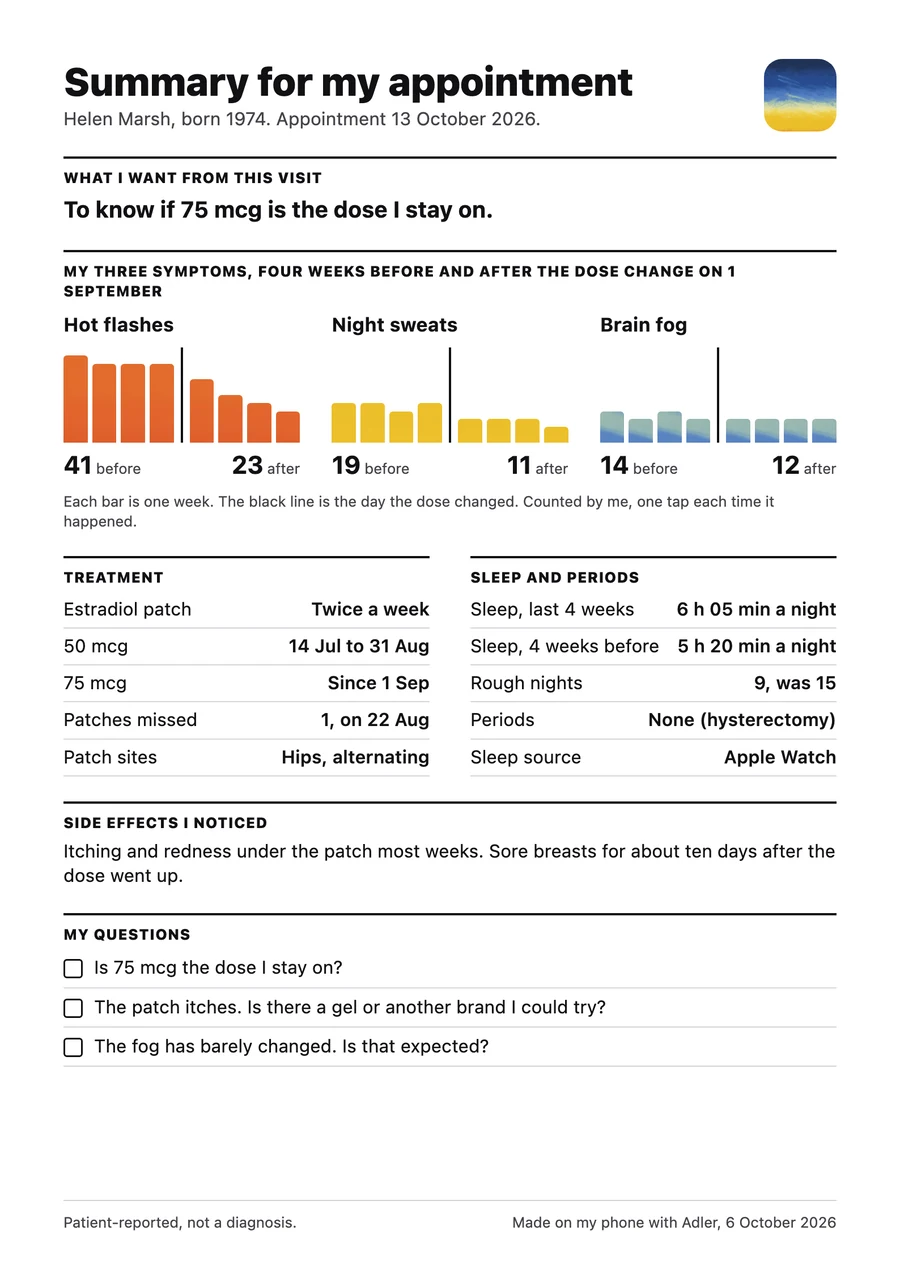
What you want from this visit.
One line, in your words, so the appointment starts with your question and not with a recap. “To know if 75 mcg is the dose I stay on.”
Four weeks before, four weeks after.
Each bar is a week of your taps. The black line is the day the dose changed. The counts sit underneath, so nobody has to squint at a chart.
The facts, in a table.
What you take and since when, the patches you missed, where they went. Your sleep, if Apple Health is on. Your periods, or that you don’t have them.
The things that are easy to forget.
The itching, the sore breasts for ten days after the dose went up. Written down when it happened, not remembered in the waiting room.
The ones you thought of at 3am.
Add them as they come. They print with a box to tick, so none get left behind when the ten minutes run out.
“Patient-reported, not a diagnosis.”
Printed on every page. Adler records what you told it. Your doctor decides what it means.

Four steps, the last one in the room.
Set the date
Add your appointment on the Doctor tab. Adler starts getting the page ready.
Add questions
Whenever one comes to you, in the queue or in the night.
Open it the day before
Read it once. Add what’s missing.
Print, send or show it
As a PDF, by email or the patient portal, or on your phone across the desk.